p5-grid-design-class
Grid design class for p5.js
This project is part of the Creative Coding series and focuses on implementing a Grid class in JavaScript to be used with p5.js. The Grid class is designed to help vizualize and manipulate 2D grids in a simple and efficient way to create grid-based designs.
Features
- Create a grid of any size
- Access and modify grid cells
- Support for various grid properties (margin, gutter, flow lines)
Live Demo
Check out the live demo of the Grid class in action and experiment with different grid configurations:
https://prossel.github.io/p5-grid-design-class/src/
Installation
To use the Grid class in your project, simply clone this repository and include the Grid.js file in your project.
git clone https://github.com/prossel/p5-grid-design-class.git
Or you can link the Grid class directly from the GitHub repository:
<script src="https://prossel.github.io/p5-grid-design-class/src/Grid.js"></script>
Usage
Example 1
Here is a basic example of how to use the Grid class:
function setup() {
  createCanvas(600, 400);

  // Default grid
  grid1 = new Grid();
}

function draw() {
  background(220);

  ellipse(width / 2, height / 2, width, height);

  // Draw the grid
  grid1.draw();
}
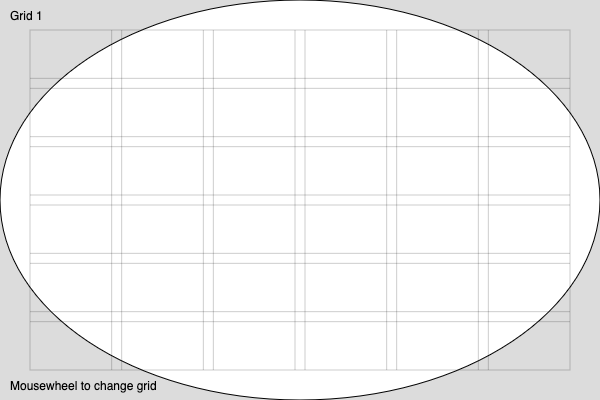
Grid 1: Default grid with 6 columns and 6 rows
Example 2
Parmeters can be passed to the Grid constructor to customize the grid:
  // Custom grid size
  grid2 = new Grid({
    gutter: 20,
    margin: 40,
    columns: 6,
    rows: 4,
  });
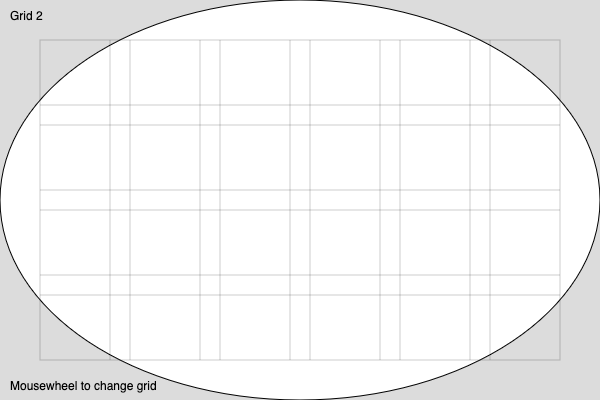
Grid 2: Custom number of columns and rows with margin and gutter
Example 3
Customize colors and add flow lines
  // Colored modules with transparent grid and flow lines
  grid3 = new Grid({
    gutter: 100, // any value will be overriden by the flow lines height
    margin: 40,
    columns: 6,
    rows: 4,
    strokeGrid: null,  // no grid
    flowLines: 5,
    fillModule: color(0, 200, 255, 30)  // set a color to draw the modules
  });
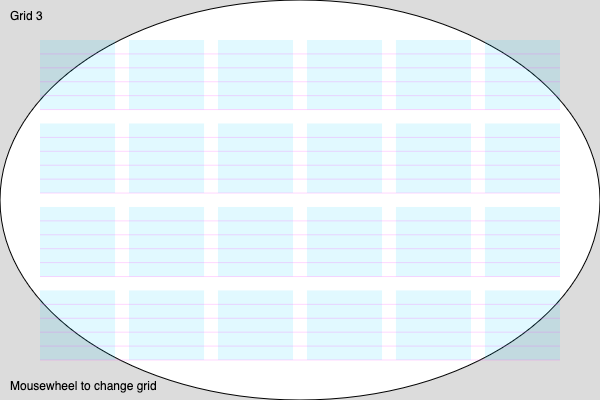
Grid 3: Customize colors and add flow lines
See more examples in sketch.js file.
Documentation
For detailed documentation on the Grid class methods and properties, please refer to the documentation if available (TODO) or read the code comments in the Grid.js file.
License
This project is licensed under the MIT License.
Contact
For any questions or suggestions, please open an issue or contact the project maintainer at https://github.com/prossel/p5-grid-design-class